
Block on difference
A file that suddenly holds far fewer products, or far more, is often a sign that something went wrong on your side: a broken export, a filter left on, a half-written file. Block source on difference makes Feedink stop an update when the number of items of a source changes by more than you allow.
What it does
Section titled “What it does”When a source is read, Feedink compares the number of items in the new file with the count of the previous update. If the change is larger than a limit you set, the update is blocked instead of going through. The source’s status reads Failed, and its settings say what was found, for example “Source blocked: the item count changed by 35% (last: 1000, current: 650).” The same words are in the steps of the update (When a source update fails).
The block is off for a new source. A channel has the same protection for its own feed: Block channel on difference. The source’s block watches the file that comes in; the channel’s watches the feed that goes out.
The two limits
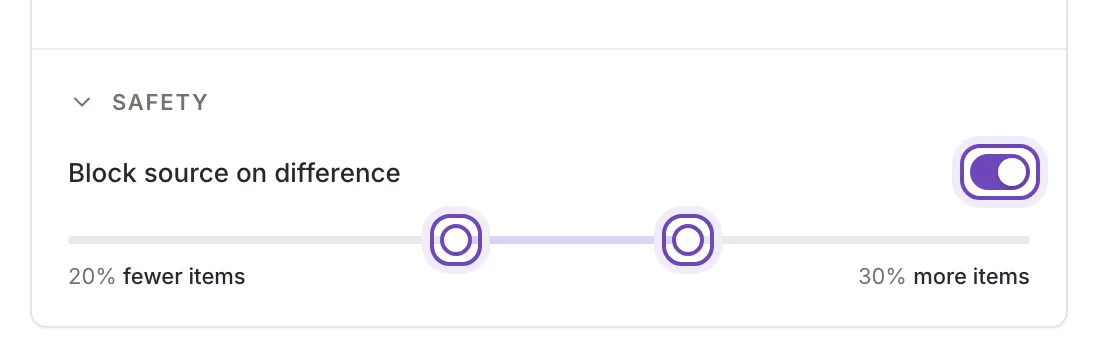
Section titled “The two limits”Under Safety, switch on Block source on difference and set the limits with the two handles of the slider. The slider is off while the switch is off.
- Lower limit is how many items the source may lose. It moves from 0% to 100% fewer and reads, for example, 20% fewer items. At 0 it reads Don't block if fewer: a drop is never blocked. At the far end of the scale it reads Over 100% fewer items.
- Upper limit is how many items the source may gain. It moves from 0% to 100% more and reads, for example, 30% more items. At 0 it reads Don't block if more. At the far end of the scale it reads Over 100% more items.
A new source starts with the lower handle at 20% fewer and the upper handle at 0, so switching the block on guards against a drop of more than a fifth and allows any growth. Each handle can also be moved with the arrow keys.
When a source is blocked
Section titled “When a source is blocked”
The message gives the change in percent, the number of items of the last update and the number of the new one. Find out why the count changed: a file that was cut short, a filter in your shop’s export, a source that is empty today. Then:
- fix the file, and update the source again (Update now); or
- if the change is wanted, for example after you removed a whole range of products, widen the limit or switch the block off, click Save and update the source again.
Where to set it
Section titled “Where to set it”The same switch and slider are in Add a source and in the Safety section of the source’s settings (Source settings), where the section opens folded; the Safety chip under the head opens it. In the settings only an owner or a collaborator can change them. A viewer sees the values but cannot move them.