
How rules work
A rule changes your items. Sources and channels each have their own rules: a source’s rules change the data as it comes in, a channel’s rules change only that channel’s feed. Source rules and channel rules says how the two differ.
Every rule has two parts:
- IF: which items it applies to (its conditions).
- THEN: what it does to them (its adjustments).
IF: which items
Section titled “IF: which items”Choose Every item to change all items, or
Items that match to set conditions. A condition compares a field of
the item with a value, for example title contains Pack. Conditions and
Condition operators say more.
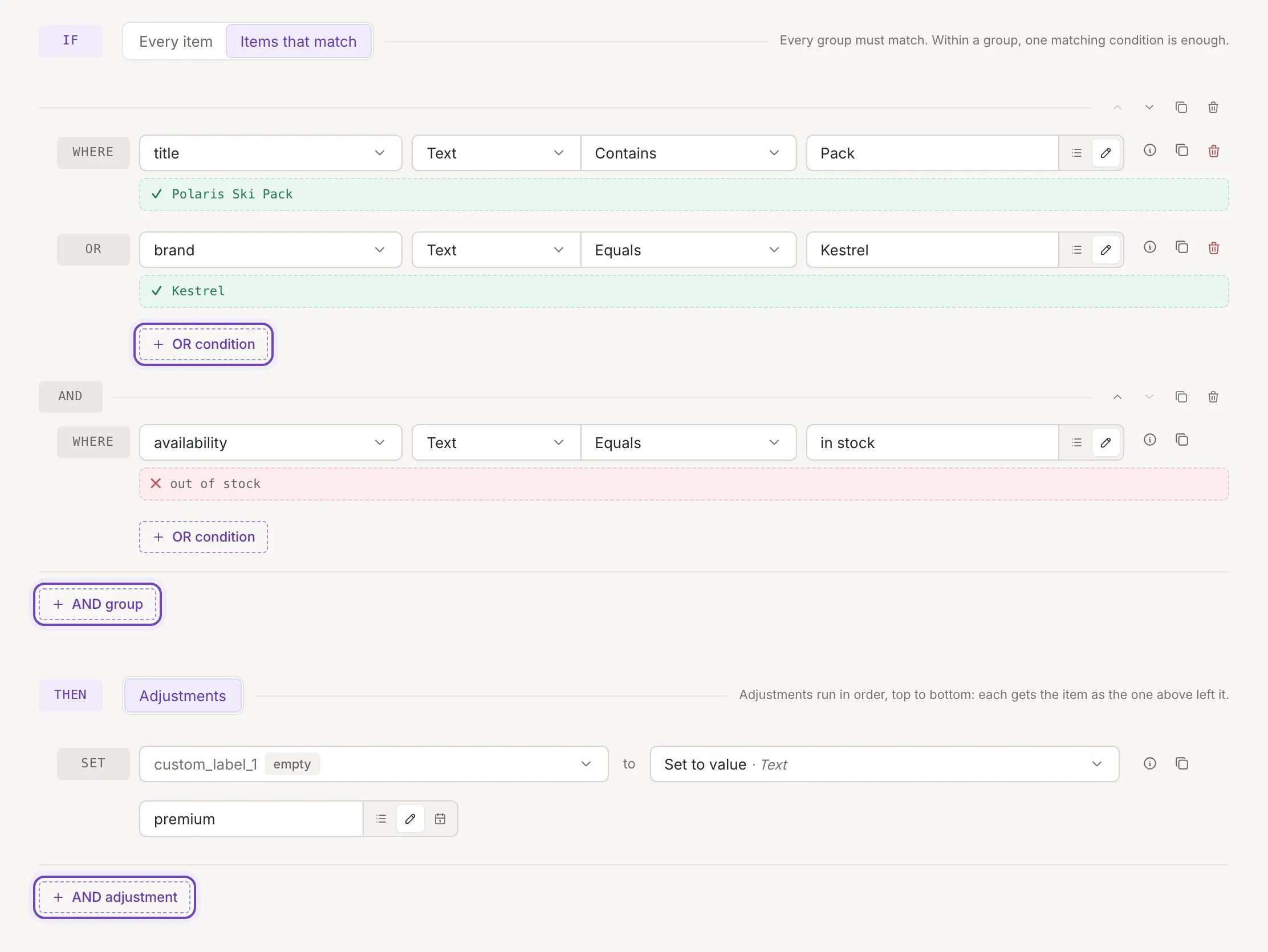
Conditions sit in groups:
- Inside a group, one matching condition is enough (OR). Add one with OR condition.
- Every group must match (AND). Add a group with AND group.
So the rule below applies to items whose title contains Pack or that are of the brand Kestrel, and that are in stock:
THEN: what changes
Section titled “THEN: what changes”Each adjustment changes one field, for example sets custom_label_1 to premium. Add more with
AND adjustment. They run in order, top to bottom: each one gets the
item as the one above left it. See Adjustments.
Add a rule
Section titled “Add a rule”Open the source or channel, go to its rules and click Add rule. Set the conditions and adjustments, then click Save. Add a rule walks through it, and Test on item shows what a rule does to an item before you save it.