
Combine data
Combine data is the card at the top of a source’s mapping. It says how the rows of this source are matched with those of another source.

When to use it
Section titled “When to use it”The card’s hint reads Match rows with a higher-priority source. Use it for a source that adds data to products another source already has, by naming the fields that say two rows are the same product, such as the id. A source with no field here is not matched with other sources; the Sources list shows how sources are ordered and which are complementary.
Choose the fields
Section titled “Choose the fields”Each field is a chip.
- The plus button (Add a field) adds an empty chip. A source takes at most three, and the button goes when there are three.
- Click a chip and pick a field (Choose a field… is an empty chip). The list offers only fields that your mapping fills, in the order of the fields.
- Drag a chip to change the order.
- The cross on a chip (Remove the field) removes it.
- A field can be used once. Picking one that another chip already has takes the new chip out and shows a warning, This field is already used to combine data. Each field can be used once.
- If you clear the mapping of a field that a chip uses, its chip goes too.
- A source that has the highest priority cannot combine: when you save a combine field on it, Feedink refuses with At least one source must have higher order.
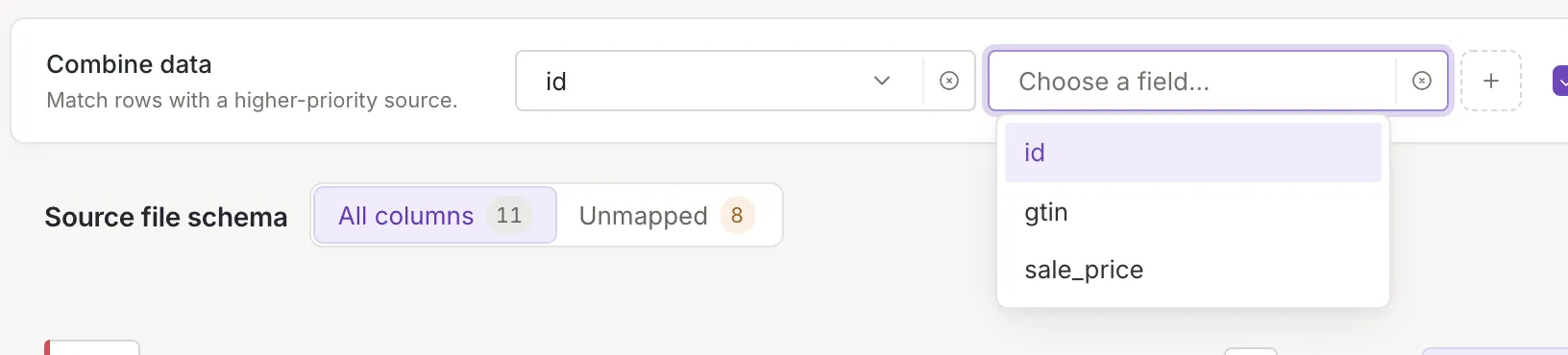
The chips are edits of the page like the rest of the mapping: they wait for Save, which sends the mapping first and then the combine settings (Save, undo and leave).
Append on duplicated rows
Section titled “Append on duplicated rows”Once a chip has a field, the card shows the box Append on duplicated rows. It decides what happens when the combined data is not unique: by default each next occurrence replaces the data already there (overwrite); with the box ticked all occurrences are kept as a list (append). Without a field in the card there is nothing to combine, so the box is not shown.
The id field must stay mapped
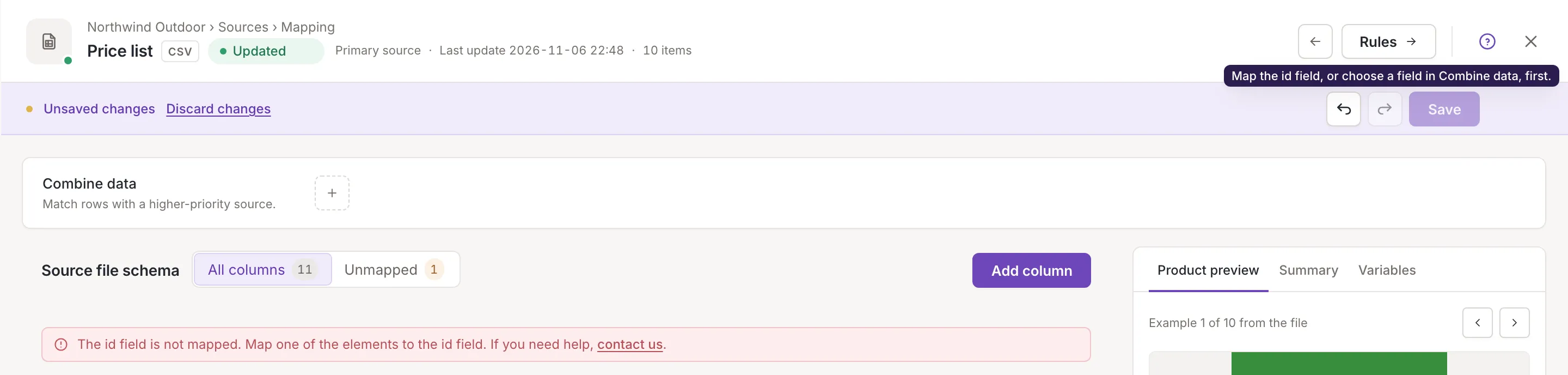
Section titled “The id field must stay mapped”A source that does not combine on any field must have the id field mapped. If it is not, an alert above the tree asks you to map an element to id (The id field is not mapped. Map one of the elements to the id field. If you need help, <a href="https://help.feedink.com/" target="_blank" rel="noopener noreferrer">contact us</a>.), and Save is off; point at it for the reason: Map the id field, or choose a field in Combine data, first. Mapping id, or choosing a field in Combine data, clears both. The picture shows the case after the mapping of id was removed from a source without combine fields.
Who can change it
Section titled “Who can change it”The card is shown to everyone who opens the mapping; only owners and collaborators can save a change (Source mapping). Channels have no Combine data card.