
Text actions
Text actions are the Text group of the action select of an adjustment. They work on the text of the field of the row. When the field holds a list, such as additional images, the action is applied to each element. The examples use made-up values.
Set, append and copy
Section titled “Set, append and copy”| Action | What it does | Example |
|---|---|---|
| Set to empty | empties the field | brand becomes empty |
| Set to value | replaces the field with a value: a field, a custom value or a date | custom_label_0 set to outdoor |
| Append value | adds a value after the text; on a list, after each element | Kestrel Trail Pack and - Outdoor give Kestrel Trail Pack - Outdoor |
| Prepend value | adds a value before the text | NEW and Kestrel Trail Pack give NEW Kestrel Trail Pack |
| Copy value | copies another field into this one (From:) | title copies brand, so it reads Kestrel |
The value of Set to value, Append value and Prepend value is chosen as described in Fields, custom values and dates. If the field the row sets is missing from the item, Append and Prepend create it with the added value. Copy value needs a field; if that field is missing from the item, the target becomes empty.
Set to empty
Section titled “Set to empty”Set to empty empties the field, whatever it held.
| Field before | Field after |
|---|---|
Kestrel |
empty |
Kestrel Trail Pack |
empty |
Set to value
Section titled “Set to value”Set to value replaces the field with the value you choose: a custom value, another field or a date.
| Field before | Value | Field after |
|---|---|---|
Kestrel Trail Pack |
custom value outdoor |
outdoor |
Kestrel Trail Pack |
the field brand, which holds Kestrel |
Kestrel |
Append value
Section titled “Append value”Append value adds the value after the text, with nothing in between, so put a space or a separator in the value if you need one. On a list, it is added after each element. If the field is missing from the item, it is created with the added value.
| Field before | Value | Field after |
|---|---|---|
Kestrel Trail Pack |
- Outdoor |
Kestrel Trail Pack - Outdoor |
front.jpg, back.jpg (a list) |
?v=2 |
front.jpg?v=2, back.jpg?v=2 |
| missing | Outdoor |
Outdoor |
Prepend value
Section titled “Prepend value”Prepend value adds the value before the text, with nothing in between. On a list, it is added before each element. If the field is missing from the item, it is created with the added value.
| Field before | Value | Field after |
|---|---|---|
Kestrel Trail Pack |
NEW |
NEW Kestrel Trail Pack |
front.jpg, back.jpg (a list) |
https://cdn.example.com/ |
https://cdn.example.com/front.jpg, https://cdn.example.com/back.jpg |
Copy value
Section titled “Copy value”Copy value puts the value of another field into this one, chosen under From:. The other field stays as it is. If that field is missing from the item, this field becomes empty.
| Field before | From: | Field after |
|---|---|---|
Kestrel Trail Pack |
brand, which holds Kestrel |
Kestrel |
Kestrel Trail Pack |
a field the item does not have | empty |
Combine values
Section titled “Combine values”Combine values builds the value from several parts joined in the order shown. A part is a field, a custom text or a date.
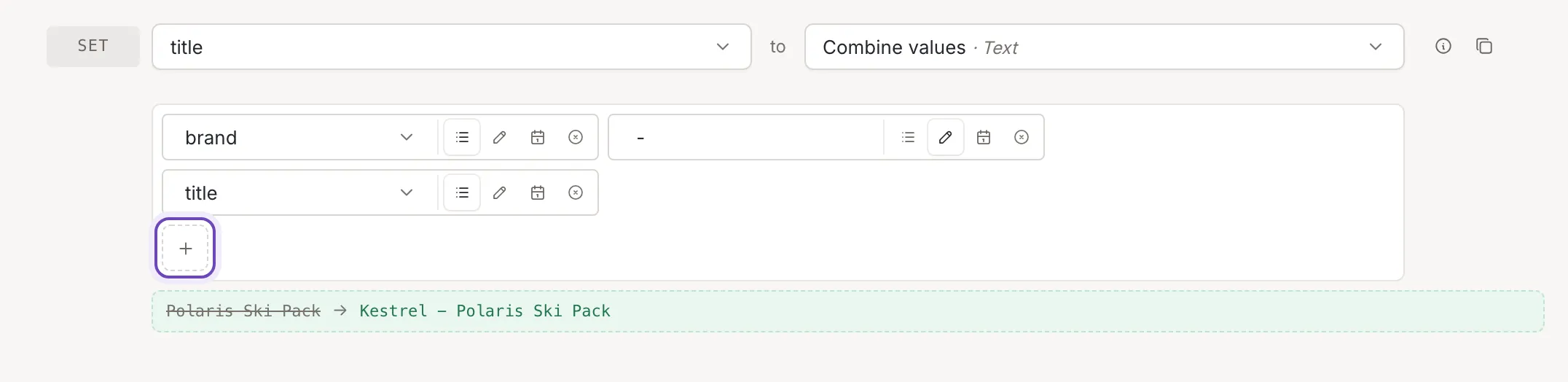
- Add a part (the plus button) adds a part. Each part has the usual value buttons and Remove.
- Drag a part to move it; Drop here shows where it will land.
- Empty parts are skipped. A custom text, such as the separator, is always kept.
- A part that is a list turns the result into a list, with the other parts added to each element.
https://cdn.example.com/followed by a field with three image names gives three links.
| Field before | Parts | Field after |
|---|---|---|
Polaris Ski Pack |
the field brand (Kestrel), the custom text " - ", the field title |
Kestrel - Polaris Ski Pack |
Polaris Ski Pack |
the field brand (empty), the custom text " - ", the field title |
- Polaris Ski Pack |
Replace
Section titled “Replace”| Action | What it does |
|---|---|
| Replace value | finds a text and replaces every occurrence of it |
| Replace multiple values | replaces many texts at once |
Replace value
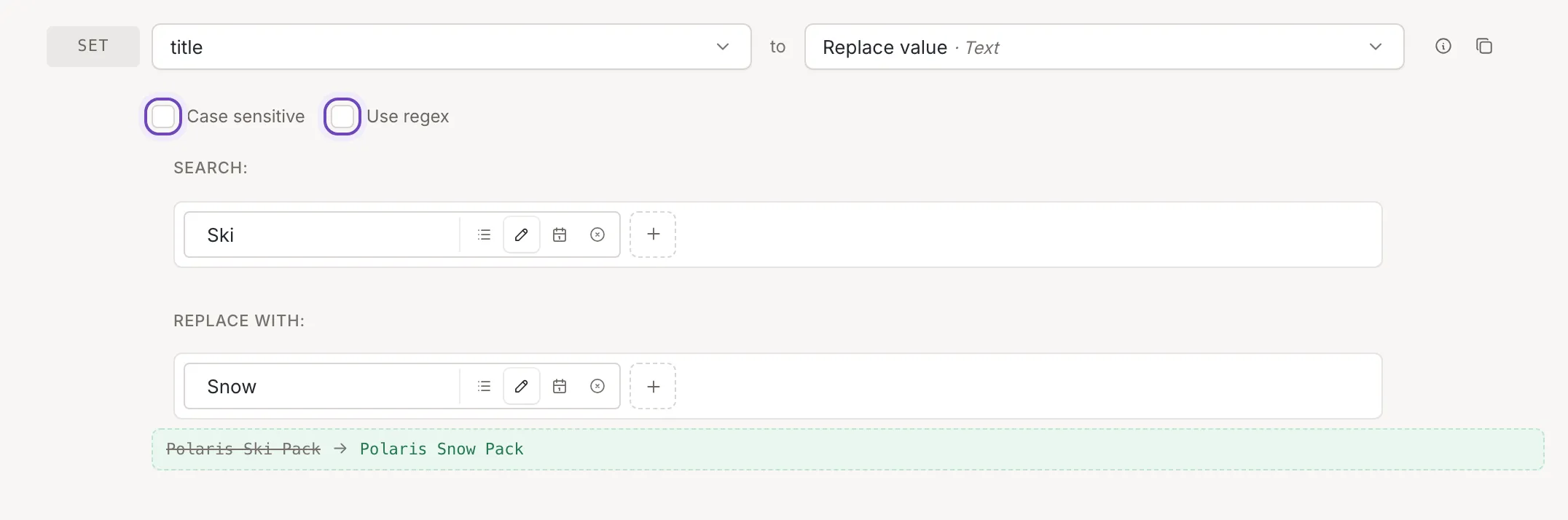
Section titled “Replace value”Replace value finds a text and replaces every occurrence of it. Under Search: and Replace with: you build each text from parts, as in Combine values. An empty search changes nothing, and an empty replacement removes the found text.
- Case sensitive is off by default:
trailalso findsTrail. - Use regex reads the search as a regular expression
without slashes or flags, and the replacement may use
$1for the first group. An expression that is not valid leaves the text as it is. Without it, the search is plain text, and every character in it, including.and$, means itself.
| Field before | Search: | Replace with: | Settings | Field after |
|---|---|---|---|---|
Kestrel Trail Pack |
trail |
Day |
none | Kestrel Day Pack |
Kestrel Trail Pack |
trail |
Day |
Case sensitive | Kestrel Trail Pack |
Kestrel Trail Pack |
\s+ |
- |
Use regex | Kestrel-Trail-Pack |
Replace multiple values
Section titled “Replace multiple values”Replace multiple values replaces many texts at once. Type the texts to find in Search: and their replacements in Replace with:, one per line: line 1 is replaced with line 1, line 2 with line 2. Lines are used as typed, so a space at the end of a line counts. Lines without a partner and empty search lines are ignored. An empty replacement line removes the text found.
- Case sensitive is off by default:
kestrelalso findsKestrel. - Sequence applies the lines one after another, so a later line can also replace text an earlier line wrote. Without it, all lines are applied at once.
| Field before | Search: | Replace with: | Settings | Field after |
|---|---|---|---|---|
Kestrel Trail Pack |
KestrelPack |
NordwindBag |
none | Nordwind Trail Bag |
Kestrel Trail Pack |
KestrelNordwind |
NordwindAtlas |
none | Nordwind Trail Pack |
Kestrel Trail Pack |
KestrelNordwind |
NordwindAtlas |
Sequence | Atlas Trail Pack |
Kestrel Trail Pack |
KestrelTrail |
Nordwind(empty line) |
none | Nordwind Pack (two spaces) |
Split, pad and limit
Section titled “Split, pad and limit”| Action | What it does |
|---|---|
| Split text | splits a text at a separator into a list, or keeps some of the pieces |
| Split text into chunks | cuts a text into pieces of a fixed length |
| Pad text | fills a text up to a length |
| Limit length | shortens a text |
Split text
Section titled “Split text”Split text splits the text at the separator typed under By:; the field becomes a list of the pieces. The separator cannot be empty. Tick Join with to keep only some pieces and join them back into a text: choose the first and the last piece to keep (And get elements from: and To:, from First to Tenth, or from the end: Last, Next to last, and so on) and the text to join them with (And combine with:).
| Field before | By: | Join with | Field after |
|---|---|---|---|
red,blue,green |
, |
not ticked | the list red, blue, green |
Outdoor>Camp>Stoves |
> |
Second to Last, joined with / |
Camp/Stoves |
Outdoor>Camp>Stoves |
> |
First to Second, joined with / |
Outdoor/Camp |
Split text into chunks
Section titled “Split text into chunks”Split text into chunks cuts the text into pieces of the size typed under
Chunk size:, at least 1. The result is a list.
Start from: decides which end gets the full pieces: the piece
that is left over, shorter than the others, comes last when you start from the beginning and first when you start from the end.
Starting from the end, a text that divides evenly gets an empty first piece: ABCDEF in pieces of 3 gives the list
empty, ABC, DEF.
| Field before | Start from: | Chunk size: | Field after |
|---|---|---|---|
ABCDEFG |
Beginning | 3 |
the list ABC, DEF, G |
ABCDEFG |
End | 3 |
the list A, BCD, EFG |
Pad text
Section titled “Pad text”Pad text fills a text up to a length. Start from: says which end gets the filling, Fill with: is the character or text to repeat, and To max length: is the length to reach, at least 1. A text that is already as long, or longer, is not changed. A filling longer than one character is repeated and cut at the length.
| Field before | Start from: | Fill with: | To max length: | Field after |
|---|---|---|---|---|
42 |
Beginning | 0 |
5 |
00042 |
42 |
End | 0 |
5 |
42000 |
7 |
Beginning | ab |
5 |
abab7 |
Limit length
Section titled “Limit length”Limit length shortens a text. Number of characters: is the most characters to keep, at least 1; a shorter text is not changed. Trim directly cuts exactly there; Trim words cuts at the last whole word that fits. The text under Replace the last characters with: is added at the end, and it counts toward the limit.
| Field before | Number of characters: | Cut | Replace the last characters with: | Field after |
|---|---|---|---|---|
Lightweight waterproof jacket for hiking |
20 |
Trim directly | ... |
Lightweight water... |
Lightweight waterproof jacket for hiking |
20 |
Trim words | ... |
Lightweight... |
Lightweight waterproof jacket for hiking |
20 |
Trim directly | none | Lightweight waterpro |
Modify text
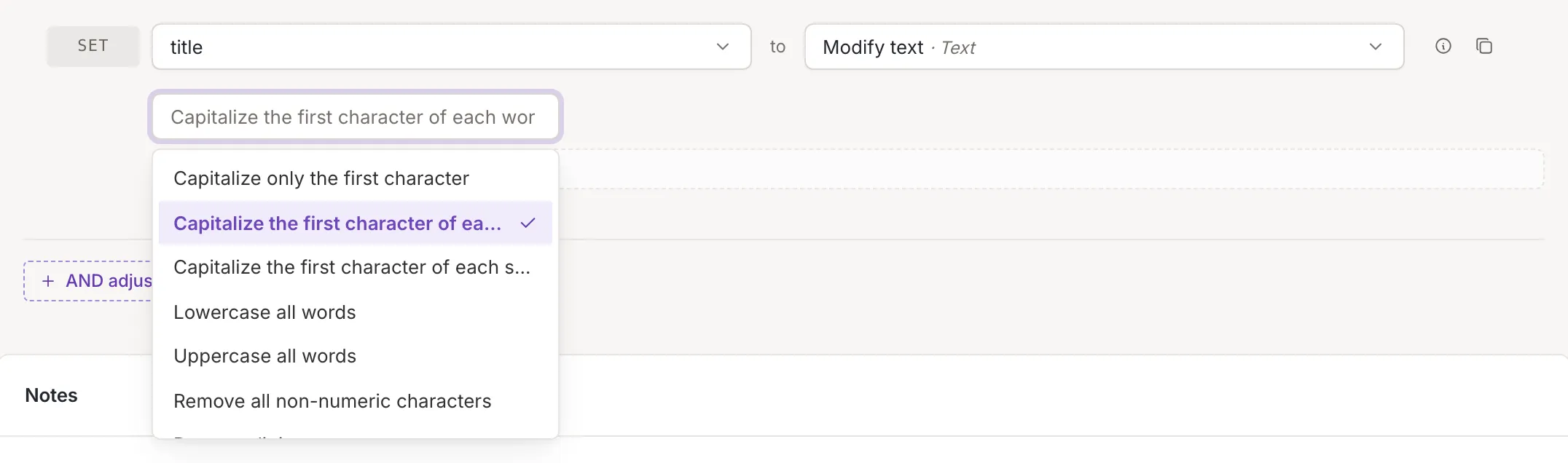
Section titled “Modify text”Modify text applies one of the modifiers from the select (Choose a modifier).
| Modifier | Example |
|---|---|
| Capitalize only the first character | kESTREL tRAIL pack becomes Kestrel trail pack: the rest turns lowercase |
| Capitalize the first character of each word | kESTREL tRAIL pack becomes Kestrel Trail Pack |
| Capitalize the first character of each sentence | first. second one! third becomes First. Second one! Third |
| Lowercase all words | Kestrel Trail Pack becomes kestrel trail pack |
| Uppercase all words | Kestrel Trail Pack becomes KESTREL TRAIL PACK |
| Remove all non-numeric characters | Size 42 EU becomes 42; only the digits stay, a decimal point goes too |
| Remove digits | Size 42 EU becomes Size EU |
| Remove line breaks | each line break becomes a space |
| URL encode | kestrel trail pack becomes kestrel+trail+pack |
| URL decode | a%20b%26c becomes a b&c |
| HTML entity encode | Tom & Jerry becomes Tom & Jerry |
| HTML entity decode | Tom & Jerry becomes Tom & Jerry |
| Remove URL parameters | https://example.com/p?a=1&b=2 becomes https://example.com/p |
| Slugify | Kestrel Trail Pack 30 L! becomes kestrel-trail-pack-30-l |
| Strip HTML from text | <p>Warm <b>jacket</b></p> becomes Warm jacket |
| Trim | removes spaces from both ends |
To check an action on a real item, switch on Test on item.