
Number actions
Number actions are the Math group of the action select of an adjustment. They write their result into the field of the row.
Use these actions on fields that hold only a number, such as a price without a currency.
Format
Section titled “Format”Format number writes a number as text with the separators you choose:
- Decimals: the number of digits after the decimal separator, from 0 to 100. The number is rounded to them.
- Decimal separator: the character before the decimals.
- Thousands separator: the character between groups of three digits. Leave it empty for none.
Each of the three is a value, usually a custom one.
Format number
Section titled “Format number”Writes the number as a text with the decimals and separators you choose, rounding to the decimals. A text that starts with a number is read from that number; any other text is read as 0.
| Field before | Decimals: | Decimal separator: | Thousands separator: | Field after |
|---|---|---|---|---|
1299.5 |
2 |
, |
space | 1 299,50 |
1299.5 |
0 |
. |
, |
1,300 |
1299.5 |
2 |
. |
empty | 1299.50 |
Round number rounds a number and writes it as a number.
- Mode: Up, Down or Closest.
- Precision: the number of decimals to keep. A negative number rounds to tens, hundreds and so on.
Round number
Section titled “Round number”Rounds the number up, down or to the closest value, to the precision you set, and writes it as a number. A precision of -2 rounds to hundreds.
| Field before | Mode: | Precision: | Field after |
|---|---|---|---|
12.345 |
Up | 2 |
12.35 |
12.345 |
Down | 2 |
12.34 |
1250 |
Closest | -2 |
1300 |
Calculate
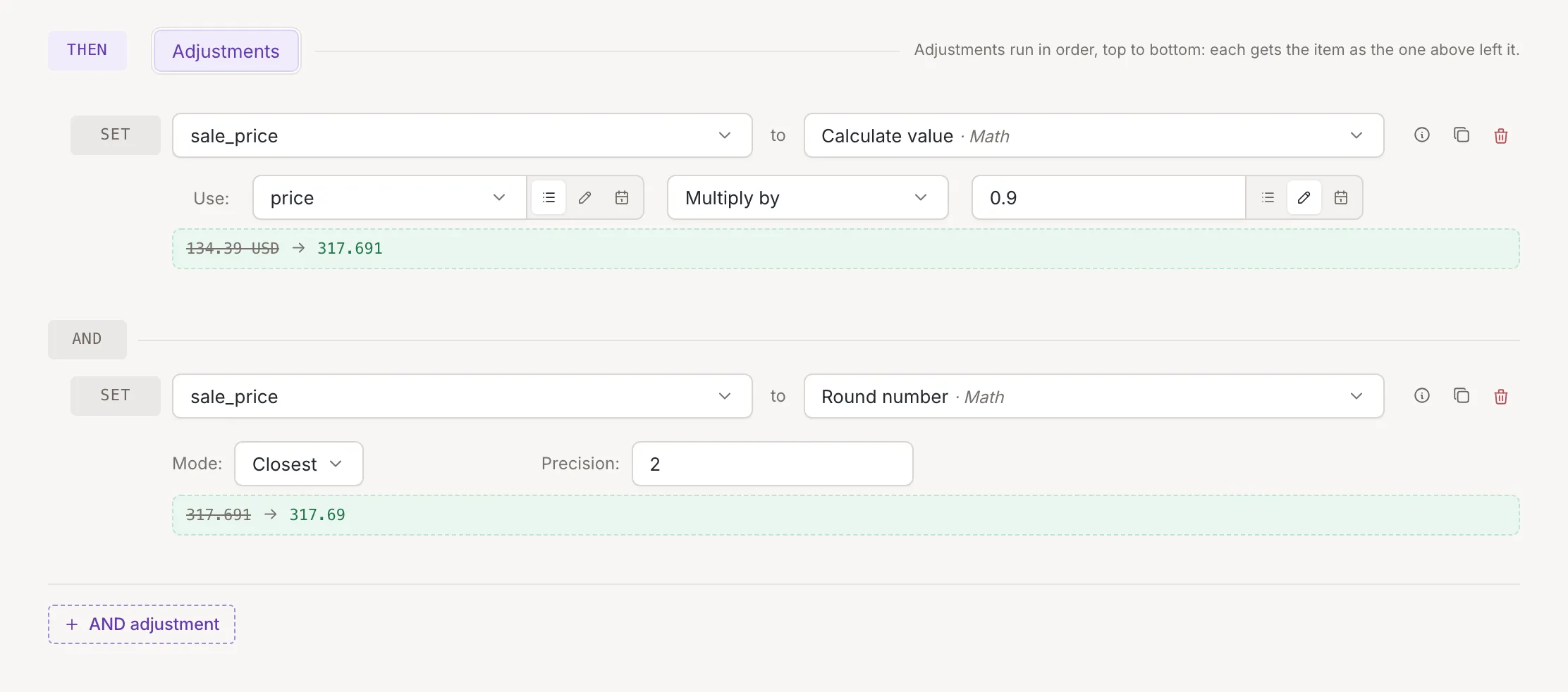
Section titled “Calculate”Calculate value calculates with two values, each a field or a number you type, after Use:. Between them, choose the operation: Plus, Minus, Multiply by, Divide by or Modulo by (the remainder of a division). The row starts with Plus selected.
- Dividing by 0, or taking the remainder of a division by 0, leaves the field empty.
Use Round number after it to get a fixed number of decimals, as in the picture.
Calculate value
Section titled “Calculate value”Calculates with two values and writes the result into the field of the row. Plus, minus and modulo keep the decimals
of the longer value, multiplying adds up the decimals of both, and a division always gives 8 decimals. Zeros at the end
do not count: 24.90 counts as 24.9.
| First value | Operation | Second value | Field after |
|---|---|---|---|
24.90 |
Multiply by | 0.9 |
22.41 |
10 |
Divide by | 4 |
2.50000000 |
10 |
Modulo by | 3 |
1 |
Calculate length
Section titled “Calculate length”Writes the number of characters of the text of the value chosen under Use:, spaces included. A list is not a text and gives 0, and so does a field that is empty or missing from the item.
| Use: | Field after |
|---|---|
Kestrel |
7 |
Kestrel Trail Pack |
18 |
[S, M, L] |
0 |
| missing | 0 |
Random number
Section titled “Random number”Random number replaces the field with a random whole number between From: and To:, both included. Each end is a field or a number. If you enter them the other way round, they are swapped; negative numbers are allowed. A new number is drawn each time the rule runs.
| From: | To: | Field after |
|---|---|---|
1 |
10 |
a number from 1 to 10 |
10 |
1 |
a number from 1 to 10 |