
E-mail notifications
E-mail notifications lists the addresses that get an e-mail about the updates of the inkspace. Each address has its own kind: every update, or only the failed ones.

The card on Inkspace settings shows each address with its kind and how many addresses are in use out of the number your plan allows. An owner or a collaborator clicks Change recipients to open the panel where the list changes; a viewer sees View and can only read. An owner or a collaborator can also open the panel from the gear in the header, over any screen of the inkspace.
Add an address
Section titled “Add an address”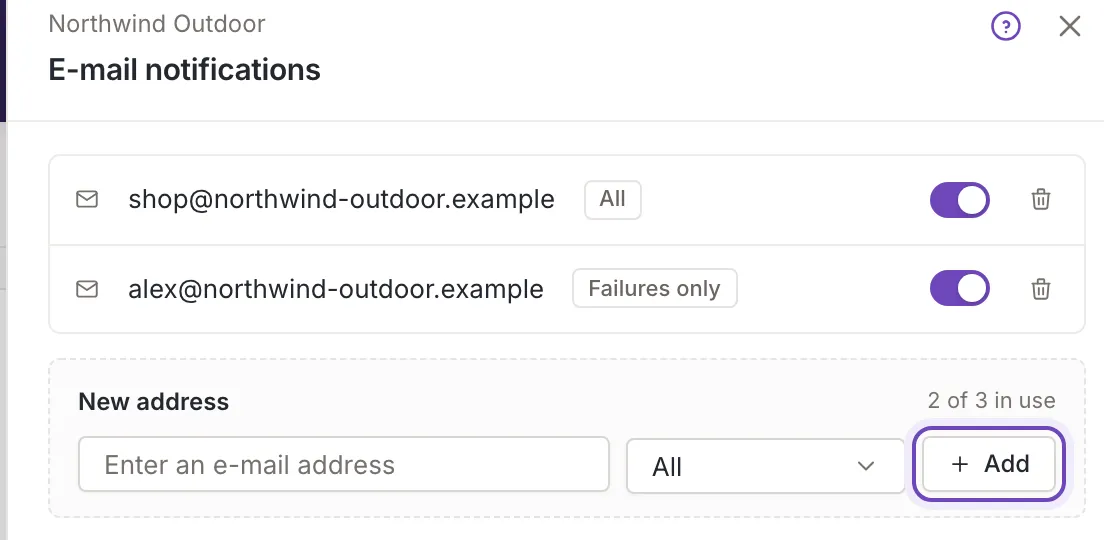
- In New address, type the address into E-mail address. Under the field Feedink offers the e-mail addresses of the inkspace’s users that are not in the list yet, each with its role; pick one or keep typing any other address.
- Under Notify about choose the kind (below).
- Click Add. Feedink says Notification e-mail added. and the field is empty again.
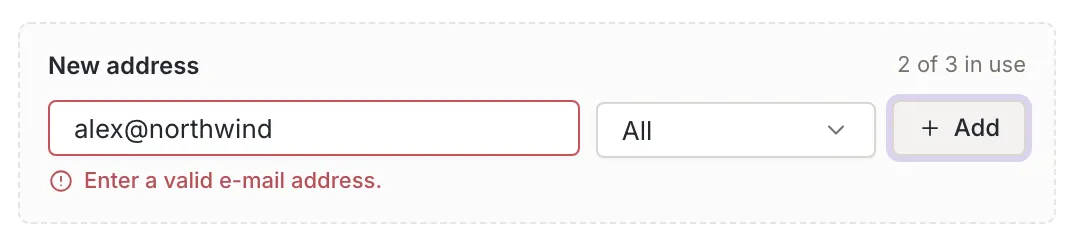
An empty field shows “Enter an e-mail address.”, an address that is not valid shows “Enter a valid e-mail address.” under the field, and nothing is added. An address that is already in the list shows This e-mail address is already added.. The panel saves at once: there is no Save button. Close closes it, and All settings opens the Settings page.
What is sent
Section titled “What is sent”- All: an e-mail about every update of the inkspace.
- Failures only: an e-mail only when an update fails.
The kind is chosen when you add the address. To change it, remove the address and add it again.
Remove or switch off an address
Section titled “Remove or switch off an address”Each row has a switch and a bin.
- The switch stops the e-mails to that address without deleting it, and turns them on again. An address that is off is not counted as in use. Feedink says Notification disabled. or Notification enabled.. While your plan’s limit is full an address that is off cannot be switched on: point at the switch for “The plan's limit is reached: disable or remove another notification first.”
- The bin removes the address. Feedink says Notification e-mail removed..
With no address the panel says No addresses yet: “Addresses added here get an e-mail about inkspace updates, all of them or only the failed ones.” If the list cannot be read, it says Could not load the e-mail addresses and offers Try again.
Limits and permissions
Section titled “Limits and permissions”Your plan limits how many addresses are in use. At the limit Add is off and the composer says “To add another e-mail address, upgrade your plan or contact support.” If your plan changes to one that allows fewer addresses, the extra ones are marked Over plan limit and get no e-mail until the plan allows more or you switch off or remove another address. See Your plan and its limits.
An owner and a collaborator can add, switch and remove addresses. A viewer can open the list to read it and nothing more. See who can change what.