
Fields, custom values and dates
Many controls of a rule ask for a value: the right side of a condition, and the text, number or position an adjustment works with. They all use the same picker. It has up to three buttons, and the one that is lit says what kind of value you are giving.

- Use a field: the value is another field of the item.
- Use a custom value: the value is text or a number you type.
- Use a date and time: the value is a date and time.
Switching to another button empties the value, so a field you chose does not stay behind as text. The date button is shown in adjustments, and in conditions only when the operator is a date operator. Some adjustments, such as Keep one element, offer a field or a fixed choice instead of the three buttons.
Use a field
Section titled “Use a field”Pick a field from the list under Choose a field…. The list
is grouped and you can search it by typing. The rule reads the field’s value from the item at that moment: if a rule
above has changed the field, the new value is used. On a channel, the list also has a group of global fields such as
feedink_id, and it has your custom variables (created in the mapping).
A field that holds a list gives the list. What an action does with a list is described in List actions.
Use a custom value
Section titled “Use a custom value”Type the value in the box (Custom value…). It is used exactly as you typed it, spaces included. A condition compares with it, an adjustment writes it. Do not put quotes around text. An empty box is an empty value, which some operators and actions treat as “nothing to do”.
Use a date and time
Section titled “Use a date and time”Choose a mode and, for most modes, a date or number. Dates come in two kinds: exact dates and dates counted from now.
Date conditions describes every mode. When an adjustment uses a date and time, it writes it as
year, month, day, hours, minutes and seconds, for example 2026-11-13 09:30:00.
Fields that are not mapped
Section titled “Fields that are not mapped”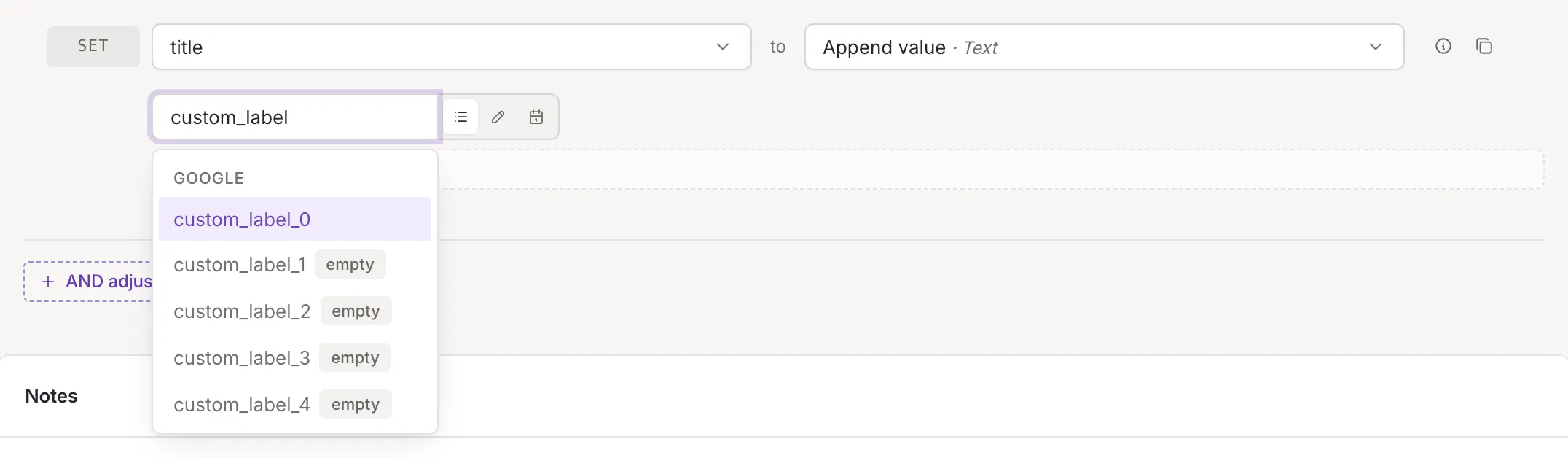
In a field list, some fields carry the mark empty. It means: No source maps this field, so it is empty unless a rule above sets it. You can still use such a field. A condition on it sees an empty field until a rule above fills it, and an adjustment that sets it creates the value. To fill a field from your own data instead, map it: see Source mapping.