
Add a rule
A rule has a name, a place in the list, conditions that pick the items and adjustments that change them. You make all of it on one screen and save it once. Only owners and collaborators can save a new rule.
Open Add rule
Section titled “Open Add rule”Click Add rule on the rules list. A source or channel without rules opens on this screen by itself, and its empty list has Add the first rule. Viewers can open the screen but cannot save.
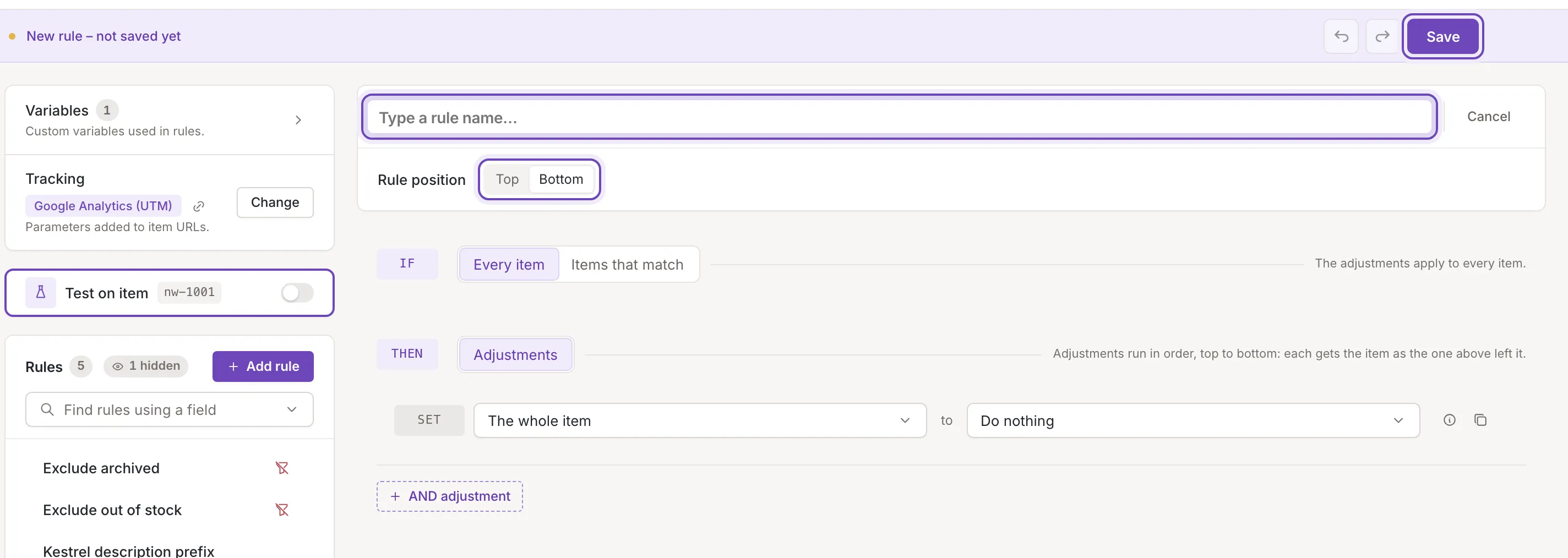
Name and position
Section titled “Name and position”Name has the cursor when the screen opens, with the hint Type a rule name…. A rule needs a name. Under it, Rule position puts the new rule at the Top or the Bottom of the list (Bottom to start with); the position decides when it runs, see Order and switch rules on or off. When the list already has rules, Cancel at the right of the name goes back to the first rule.
Conditions and adjustments
Section titled “Conditions and adjustments”A new rule starts with Every item, so it would apply to every item, and one adjustment that does nothing. Choose Items that match to add conditions, and set the adjustments that change the items. How the two work together is in How rules work. While you build the rule, Test on item already tests it, at the position you chose: its This rule view and the lines under the conditions and adjustments work before you save. The marks in the rules list and the All rules view count the rule once it is saved. Rules do not have a time limit on this screen; set one after saving (Run a rule between two dates).
The bar at the bottom of the screen says New rule – not saved yet. Its undo and redo buttons step through your edits, and Discard changes appears once you have changed something and takes the new rule back to empty (The new rule goes back to empty.).
Click Save. Feedink creates the rule, then saves its conditions and adjustments, and opens the new rule, which now appears in the list. Without a name nothing is saved: the name is outlined, its hint changes to Type a rule name to save it… and the cursor goes there.
If saving fails
Section titled “If saving fails”A toast titled Rule not saved says Could not save the rule. Try again. and the form stays as it is. If the rule was created but its conditions and adjustments were not saved, the toast is titled Conditions and adjustments not saved and says The rule was added without its conditions and adjustments. Save again to save them. The rule is already in the list then. Click Save again: Feedink sends the missing part and never creates a second rule.